Batch Transactions

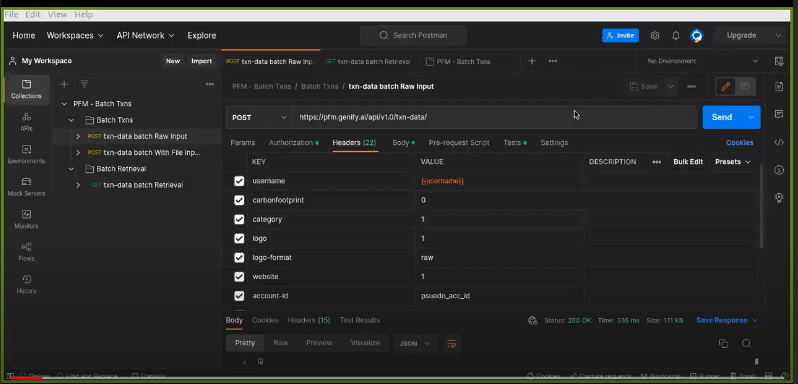
This Endpoint will automatically operate as a batch endpoint whenever it gets an input as "raw body," "CSV file," or "JSON file." All these different input methods can be found in more detail in the Postman collection. The input should ideally contain a list of transactions to be processed in batches, with a maximum limit of 500 transactions per batch.

Recent Requests
Log in to see full request history
TimeStatusUser Agent
Retrieving recent requests…
LoadingLoading…

Batch Transactions Demo

JSON-based input to Batch Txns Endpoint

JSON-based input to Batch Txns Endpoint

Body Params
txns
array of objects

We add in the raw body option (JSON Formatted), a list containing transactions in form of a JSON object each Transaction Parameters Required are: { "description", "amount", "country"} Optional: {"mcc", "bank-code"}

txns
Headers
string
required

Your username.

string
required

Can be filled by 0 during your testing. In production, you should send an end-user pseudo-ID (1 person using your app ⇒ 1 unique pseudo-ID)

string
Defaults to model_5

Name of the categorizer model to use. Defaults to model_5.

int32
Defaults to 0

If 0 or omitted, omits category name and id values from response.

int32
Defaults to 0

If 0 or omitted, omits carbon footprint value from response.

int32
Defaults to 0

Flag specifies whether to get merchant website or not. value: 0(default) or 1.

int32
Defaults to 0

If 0 or omitted, no logo is returned.

string
Defaults to raw

Logo format you want returned. Options: [Default: raw, round, square]

Responses

Language
Credentials
Header
LoadingLoading…
Response
Click Try It! to start a request and see the response here! Or choose an example:
application/json